
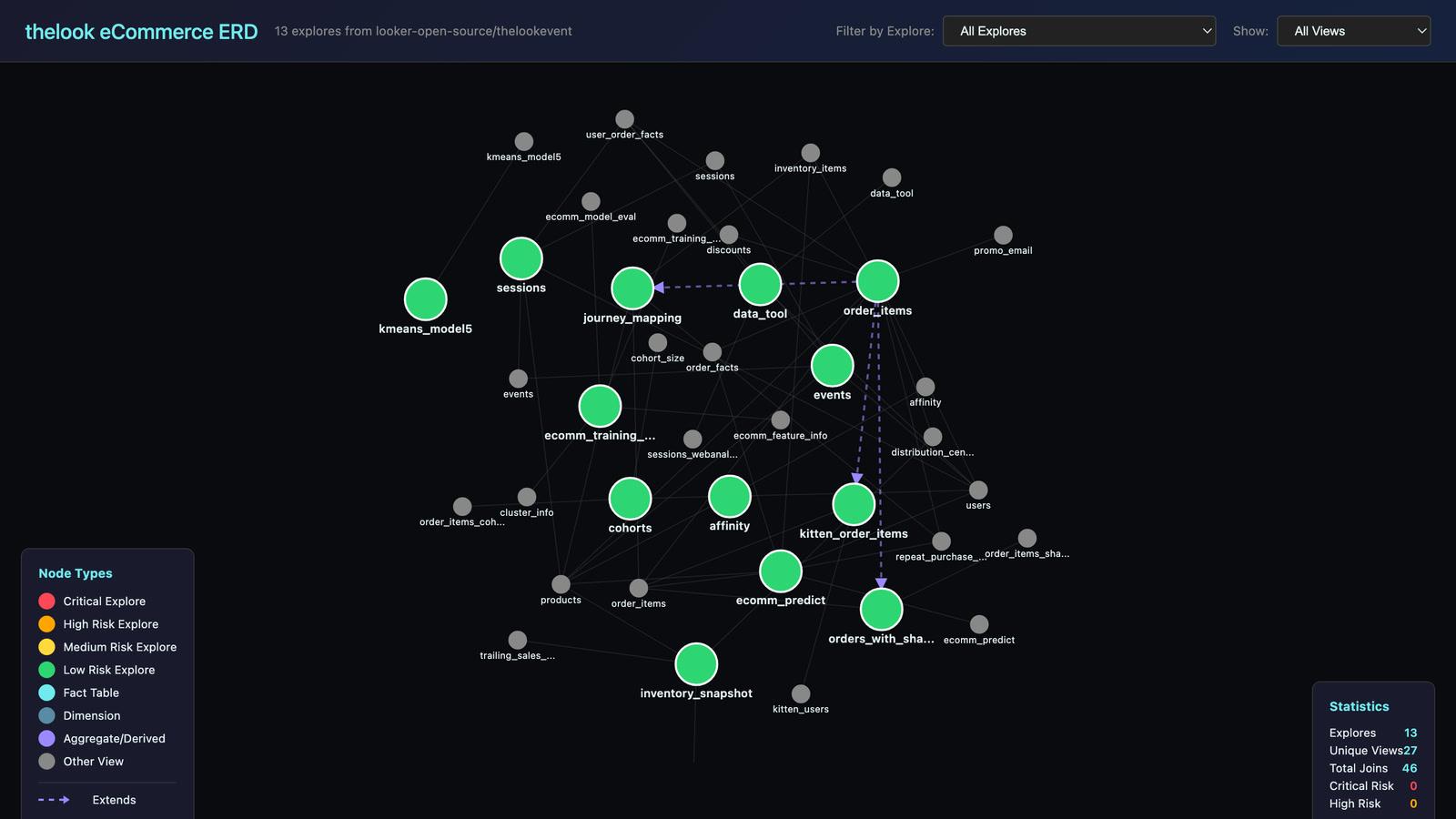
The Looker to Omni migration toolkit is a free, open-source set of AI agent skills for planning a move from Looker to Omni. It reads your LookML and gives you a map of every explore, a picture of which dashboards depend on what, and a view of which joins to rebuild in the warehouse first. You start the migration with a plan instead of a guess.
Why Looker Migrations Go Wrong
Rebuilding dashboards is rarely the hard part of a BI migration. The hard part is knowing what you have before you move anything.
A Looker estate that has grown for a few years usually holds far more than anyone can describe from memory. There are explores nobody owns, views that half the business depends on, and joins that run on every query whether they are needed or not.
There is also a large blind spot. Dashboards that people built themselves in the Looker interface are not stored in the LookML code at all. On a mature estate they often outnumber the dashboards in the code, so a plan built from the code alone can miss most of the content people actually use.
Teams that start rebuilding without a map tend to find these surprises halfway through, when they are expensive to fix. We built the toolkit so that our own migrations start with the whole picture.
See Your Whole Looker Estate
The toolkit runs inside your Looker repository and produces interactive pages you can open in a browser and share with the team.
A map of every explore. Each explore is drawn with the views it joins and scored for risk by its size and number of joins. An explore over 500 lines with more than 50 joins is critical and should move last. One with 100 lines or fewer, or ten joins or fewer, is low risk and a good place to start. Click any explore to trace what it depends on, including explores that extend other explores. The map at the top of this page is one of these, and you can open the live version.
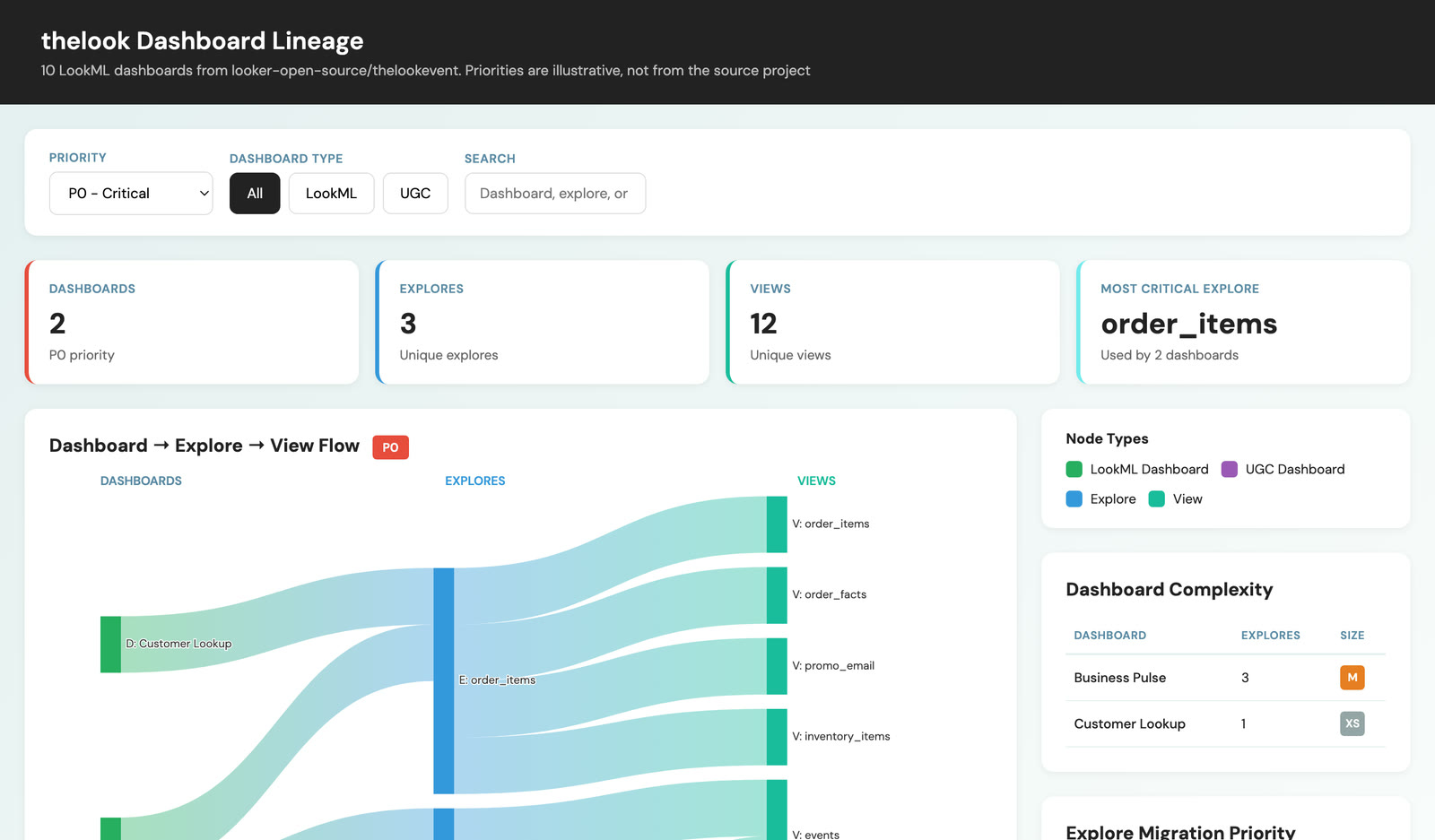
A picture of which dashboards depend on what. A lineage diagram follows each dashboard through the explores and views it uses, filtered by priority, and ranks the explores that carry the most content. Those are the ones that matter most to get right.
A review of what to build in the warehouse. Some joins cost you on every single query. The toolkit lists the joins and shared derived tables worth building in the data warehouse before the move, the ones that can stay as they are, and a suggested structure for the new Omni topics on top.
The dashboards the code cannot show. A query against Looker's own usage data finds the dashboards that people built in the interface, along with their owners and how many tiles each one has.
Both examples are real output, generated from Looker's public demo project. Click the diagram above to open the live, interactive version.
How We Plan a Migration With It
We plan Looker to Omni migrations in four steps, and the toolkit covers the first two.
- Analyse. Map every explore and its risk, trace which dashboards depend on which explores, and run the usage query to find everything the code does not hold.
- Plan. Group dashboards by the explores they share, so related content moves together. Start with the low-risk explores to prove the approach before taking on the large ones, and decide what to build in the warehouse first.
- Migrate. Move the shared views that everything uses, such as dates and customers, before the explores that rely on them. Where one explore extends another, the one being extended moves first.
- Validate. Compare the numbers in Omni against Looker and test the rebuilt dashboards before Looker is switched off.
A migration runs for weeks and produces a lot of decisions: which explores were merged, which joins were moved into the warehouse, which dashboards were retired instead of rebuilt. We keep those decisions in a project tracker that the AI can read and update, so each working session picks up where the last one stopped.
Why We Made It Free
We built the toolkit from the questions we kept asking on our own migrations, and every team planning the same move needs the same answers.
Giving it away means a data team can size its migration before talking to anyone, and when we do work together, we both start from the same map. It also keeps us honest, because anyone can read exactly how the risk scores and recommendations are worked out.
Your Looker code stays in your own repository, and nothing from it is copied into the toolkit. It is released under the Apache 2.0 licence and works with the AI coding agents most teams already use. The repository on GitHub has the setup instructions.
Looker to Omni Migration FAQs
What is the hardest part of a Looker to Omni migration?
Knowing what you have before you start. The dashboards are usually straightforward to rebuild once you know which explores they depend on, which content is still used, and which joins need to change.
How do I find dashboards that are not in my LookML?
Query Looker's System Activity. Dashboards built in the Looker interface are stored there and not in your repository. The toolkit includes a ready-made query that lists them with their owners and tile counts.
Which explores should I migrate first?
The small, low-risk ones. They prove the approach and the new Omni structure before you take on the large explores that many dashboards depend on. Shared views should move before the explores that use them.
Should I rebuild every Looker dashboard in Omni?
No. A migration is a good moment to retire content nobody uses. The usage data shows which dashboards are worth rebuilding and which can be archived.
Is the toolkit free to use?
Yes. It is open source under the Apache 2.0 licence, and the code is on GitHub.
Does Hawkfry do the migration as well?
Yes. We plan and deliver migrations to Omni, and train teams to run it themselves. You can read how one data team made the move from another BI tool in 30 Days to Self-Service Analytics.
Planning a Move to Omni?
Start with the toolkit and see what your Looker estate really looks like. If you would like a hand with the plan or the migration itself, get in touch.